
"We could just use the API." You could. We did, for years. Here's what that path actually looks like, what it gives you, and what it doesn't. Then decide whether the build is worth the operating model that comes for free with Deltastring.
Last reviewed 08/06/2026.
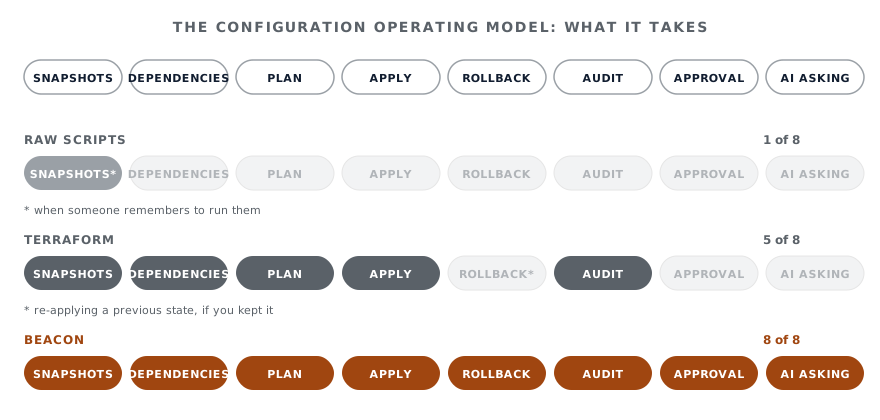
If your Zendesk has been around for a few years, you almost certainly already have a folder of scripts. Someone wrote a thing to export triggers when an audit was due. Someone else wrote a thing to compare sandbox and production. There’s a Python notebook from a project two years ago that nobody’s run since. Maybe a Node script that copies form fields between brands. They run when someone remembers to run them.
That’s the DIY path. It works. Most large Zendesks have a version of it. It also has a shape we recognise, because we used to be that team:
This isn’t a criticism of any of those scripts. They were built to answer the question that mattered that week. The criticism is that the operating model around them never came.
Read access to the configuration. Write access to most of it. Pagination, rate limits, occasional inconsistencies between object types. Authentication via API tokens or OAuth. That’s the surface.
The API is a building material. It is not a system. The work between “we have an API” and “we have a system that handles changes safely” is the work we did at Deltastring. It’s not small.
There are several community-maintained Terraform providers for Zendesk: nukosuke/zendesk is the most popular, with andsafe-AG, yosuke-tamura, Diogo-Costa and gbrlsnchs all maintaining alternative providers. If your team already runs Terraform for the rest of your infrastructure, “Zendesk as code” is a real option.
Terraform fixes some of the problems on the list above. You get a declared state. You get terraform plan showing the diff before you apply. You get a state file that records what’s deployed. You get CI/CD pipelines wrapping the apply with review.
It doesn’t fix the rest. The community providers cover a subset of Zendesk’s object types, not all of them, and not always the latest. The state file is one user’s view of the world; multi-user state requires Terraform Cloud or your own backend with locking. Rollback is “apply the previous state”, which requires keeping that state around and trusting it matches reality. The plan is a Terraform plan, not a Zendesk-aware plan: it doesn’t know which trigger references which group as a dependency-ordering concern; it just shows API field diffs. The cross-instance promotion that Deltastring does as a first-class operation isn’t a native Terraform concept.
And the agent question: an AI assistant calling terraform plan and terraform apply is a different security shape from an AI assistant calling Deltastring. The Terraform binary holds the credentials. The state file holds the credentials. The CI pipeline holds the credentials. Each is its own surface to reason about.
If your team is committed to Terraform, you can run Terraform and Deltastring side by side: Terraform for the parts of your stack that genuinely benefit from “everything declared in code”, Deltastring for the configuration management operating model and the agent interface. Some teams will. Others will move the Zendesk config off Terraform onto Deltastring once the agent interface is the workflow people actually want to use.
If Terraform is your operating model and you don’t want an agent, you don’t need Deltastring. That’s honest. The agent and the operating model arrive together.
A short list of things that need to exist for the DIY path to be the operating model you want, rather than a folder of scripts. The list is from doing this work, not from imagining it.
Each one of those is achievable. The compounding cost is the maintenance, because Zendesk keeps shipping. Deltastring has shipped support for new object types within days of Zendesk releasing them. The DIY path has someone noticing in three months that a recent platform change made a script lie about coverage.
Deltastring’s agent interface is the same shape of question applied one layer up. If your DIY path is a folder of scripts, the DIY agent path is a folder of scripts plus an MCP server you wrote, plus credentials given to an AI assistant, plus whatever guardrails you remembered to add. Or the unguarded version, which is the one we strongly advise against and have written about on Why you don’t want a direct-to-Zendesk MCP.
The work we did for the agent interface on top of Deltastring is the work that lets the agent be safe by construction rather than by promise. The agent has no Zendesk credentials. It calls Deltastring, which already has the plan/apply split, the approval gate, the audit, the rollback. If you build this yourself, you build all of that yourself first.
Glue. Custom integrations that hit other systems in your stack. One-off migrations. Reporting needs Deltastring doesn’t cover yet. Things specific to your business that an off-the-shelf product won’t know about. There’s a reason Deltastring ships a REST API and webhooks: the DIY path is a real path, and Deltastring is built to play nicely with it. You should still have scripts. You shouldn’t be running your platform out of them.