
They didn’t want to. The work was urgent. The AI assistant on their desk could obviously help if it could see the data. They generated a token, pasted it into the chat, and got the job done. Maybe they remembered to revoke the token afterwards. Maybe they didn’t. The conversation is sitting in someone’s chat history with the token in it. Nobody told you. Nobody logged it. This page is what we built so they didn’t have to.
This isn’t a hypothetical risk. It’s what’s happening in every organisation that has AI assistants and SaaS at the same time. The friction between “I have a problem” and “I can describe the problem to Claude or ChatGPT” is now zero. The friction between “Claude could help if it saw the data” and “I’ll paste the API key in just for this one thing” is small enough that any tired engineer at the end of a long week will cross it.
The result is that production credentials are flowing into AI conversations across your team, right now, with no audit trail, no scope control, no revocation policy, and no record of what got done with them. The token sits in the conversation’s context for the lifetime of the chat. If the chat history is synced to a cloud account, the token is synced too. If the user’s chat client is breached, every token in every conversation is breached.
This isn’t a security problem caused by the AI. It’s a security problem caused by the absence of a sanctioned path. People do this because the alternative is “ask the admin and wait”, which doesn’t survive contact with a deadline.
There are open-source MCP servers that wire an AI assistant straight into your Zendesk API. They’re better than pasting a token into a chat, because at least the credential lives in a config file rather than a conversation. They’re also, in another sense, worse, because they make the pattern feel sanctioned. The token still has the access it has. The AI still has the agency it has. The only thing that’s changed is that more people now feel comfortable doing it.
The ones that touch configuration share a property the README usually mentions in passing: they hold an API token, and that API token can do anything the token’s owner can do. When you wire one up, you’re giving an AI assistant the same access as the person who set it up. If the person is an admin, that’s the keys to the configuration. Every trigger. Every group. Every field. Every form. Every routing rule. Every API integration. Every webhook.
That access is one prompt-injection away from running an operation you didn’t approve. It’s one model hallucination away from a destructive change. It’s one accidental cut-and-paste away from a request the AI takes seriously when you meant it as a joke. There is no second layer. The token gives the AI everything the token gives anyone.
We’ve seen the open-source Zendesk MCP servers in customer environments. They were installed for good reasons. They worked until they didn’t.
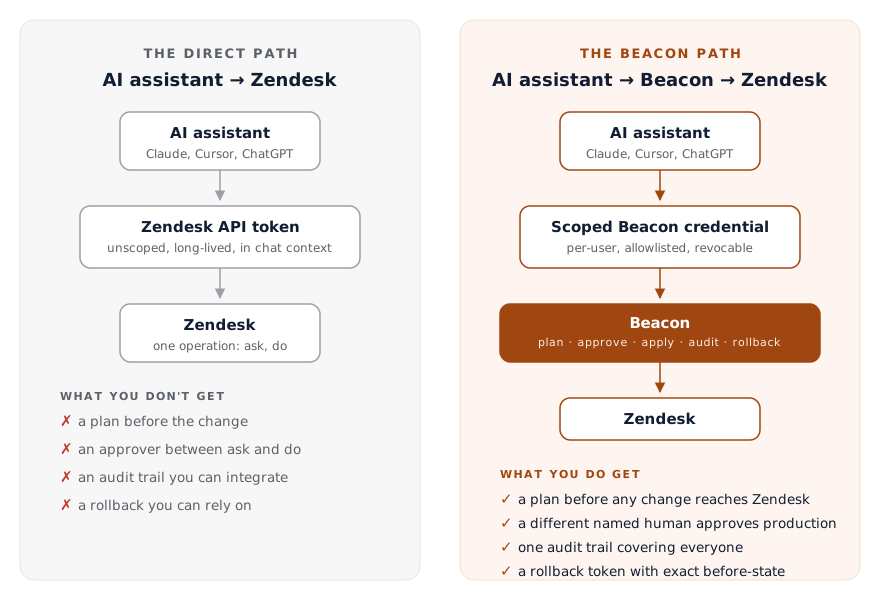
A direct-to-Zendesk MCP server, however well-built, structurally cannot give you four things you need.
A plan before the change. The direct path is one operation: ask, do. The model decides what to do, calls the API, and you see the result. If the model misunderstood your request, the result is in your production Zendesk before you knew there was a misunderstanding. You can’t review what you didn’t see.
An approver between the request and the change. A direct MCP has one human in the loop, which is the person asking. There’s no one between “I asked” and “it happened”. That’s fine in personal sandboxes. It’s not fine in shared production, where one person asking shouldn’t be enough to change configuration that affects everyone else’s tickets.
An audit trail that integrates with everything else. Direct MCP servers log whatever the AI client logs, in whatever format the AI client picks. Your compliance pipeline already knows how to ingest Deltastring’s audit, your Zendesk audit, your IAM logs. It does not know how to reconcile a JSON dump from one developer’s Claude Desktop conversation with the rest of your trail.
Rollback you can rely on. The direct path can attempt to reverse a change, but the reversal is best-effort. The AI does its best to remember what was there before, and writes back what it thinks the previous state was. Deltastring’s rollback isn’t a best effort. It holds the exact before-state of every object the change touched. One click, exact reversal. The direct path can’t do that because the direct path never snapshotted the before-state in the first place.
These four aren’t features you can bolt on later. They are the shape of how a change happens. The direct path made a different shape: ask, do. You can’t add a plan to a system that decided not to need one.
The current generation of AI assistants is good at understanding plain-English requests and turning them into structured operations. They’re getting better at it monthly. That part is real, and it’s the reason an agent for Zendesk configuration is now possible at all.
They are not yet, and may never reliably be, at the point where you’d want them deciding whether a configuration change should be made in production without a human review. The same model that interprets “rename the Tier 2 group” correctly nine times will, on the tenth, interpret it as “rename every group containing the word Tier”. The cost of that tenth interpretation depends entirely on what’s between the model and your data.
A direct-to-Zendesk MCP puts nothing between. Deltastring puts plan, approval, audit and rollback between.
Deltastring was already the answer to “we want a tool that knows the platform’s quirks, plans changes before applying them, audits everything, and lets us reverse anything”. The agent interface is a new way to ask Deltastring to do those things. The safety machinery doesn’t move. The route a change takes is the same one Deltastring already enforced for human-driven changes.
That’s not because we layered safety on top of the agent. It’s because the agent was built to ask Deltastring, and Deltastring was already the system you wanted in front of an API token. The AI assistant never gets Zendesk credentials. The AI assistant gets a Deltastring credential, with a scope, with an allowlist, with an audit log, with revocation that’s immediate.
For sandbox work, the agent can apply through Deltastring after the user confirms. For production, the agent has no apply path at all. It returns an approval URL to Deltastring’s web app, where a different named human reviews the plan and clicks Approve. Self-review is blocked at the route. The blast radius of a misunderstanding is “I see the plan and I decline it”, not “I read the audit log and try to work out what just changed”.
The pitch for direct-to-Zendesk MCP is convenience. One install, one token, your AI can act. The pitch for Deltastring-with-an-agent is that you don’t have to choose between convenience and control.
You can ask the AI assistant for help with configuration work without giving it credentials, without giving it carte blanche, without losing the audit trail you already have, and without making “what just happened” a question your team can’t answer.
The convenience cost is small: you mint an MCP credential in Deltastring instead of pointing the AI assistant at the Zendesk API. The risk reduction is the entire safety envelope. That’s not a hard trade.
We mean it. The open-source projects are honest, well-built tools. We’ve named the good ones on the comparison page. They are not safe to put in front of production configuration, and most of their README files say so in different words. We’ve seen them fail. The failure modes are the ones you’d predict.
If you’re an individual admin in a personal sandbox, do whatever you like. If you’re a team running a real Zendesk with real customer data behind real triggers, don’t put an AI assistant in front of your API. Put it in front of Deltastring, and put Deltastring in front of your API. That’s the entire product.
Deltastring is live now. Ten days free, only the days you use it count, no card. Start the trial › or see the Deltastring overview.