
There are now around a dozen Zendesk MCP servers on GitHub. The good ones do useful work. Most of them are ticket-shaped: search a ticket, read its history, post a reply. A couple go further. None of them so far do the thing Deltastring does, which is treat your Zendesk configuration as a managed system the agent can change safely. This page is an honest map of what's out there and where Deltastring sits in it.
Last reviewed 08/06/2026. The open-source field is moving. We'll keep this current.
Two axes worth thinking about.
What can the agent do? Read your data. Or read and write tickets. Or read and write configuration. Each step up is a different category of risk.
What stops it doing the wrong thing? Nothing. Per-call confirmation in the AI client. Or a safety envelope: plan/apply split, approval gate, audit log, rollback.
The open-source projects sit on the first axis, mostly at “read data” or “read/write tickets”. A few touch configuration. None of them ship the second axis. Deltastring is built on the second axis.
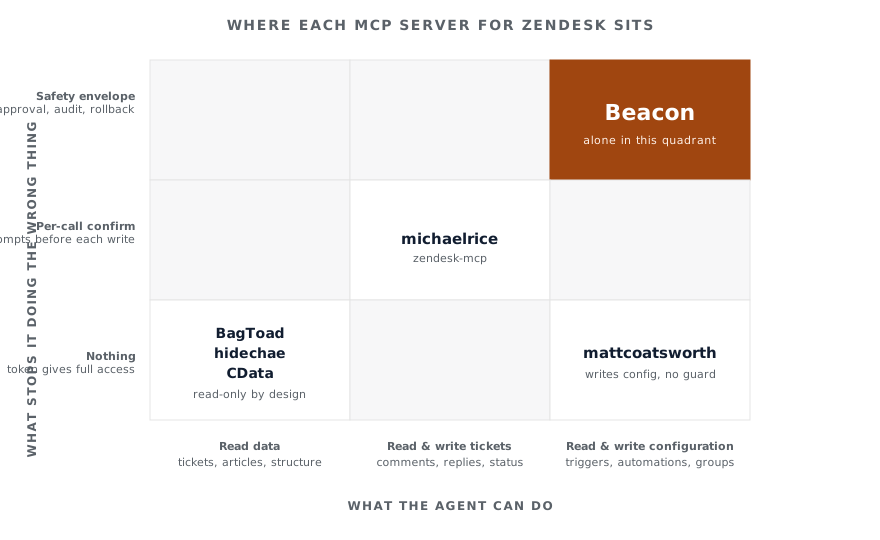
The ticket-shaped servers are well-built tools for AI assistants that want to help with day-to-day support work. Search tickets, summarise threads, post a reply, apply a macro. The good ones (michaelrice/zendesk-mcp is a clear standout) add per-call confirmation for anything that writes, which is the right move at this layer.
The Help Centre server (hidechae/zendesk-help-center-mcp-server) does one thing precisely and stops. We recommend it for anyone who wants AI search across their articles and nothing else.
The CData server (CDataSoftware/zendesk-mcp-server-by-cdata) is read-only with a SQL-shaped query model. If your AI workflow is “ask data questions across multiple SaaS in one place”, that’s the shape that fits.
The original cookie-based project (BagToad/zendesk-oauth-mcp) is read-only and deliberately limited in scope. The author has been clear about the cookie-extraction model and chose to make the tool read-only because the access the cookie grants is much broader than the tool needs.
These are not Deltastring’s market. We don’t try to compete with them, and where someone asks “I want an AI assistant to help my agents with tickets”, we’ll point them at the right open-source project.
Two places.
First, configuration management. Most of the projects don’t touch triggers, automations, fields, forms, groups or views beyond reading them. The ones that do, mattcoatsworth/zendesk-mcp-server being one of them, expose write operations on configuration objects through the API directly. There is nothing between “the AI asks for a change” and “the API receives it”. No plan to review. No approver. No audit beyond whatever the AI client logs. No rollback token if the change is wrong.
That’s fine for a personal sandbox. It is the wrong shape for production. We’ve written the longer argument on Why you don’t want a direct-to-Zendesk MCP.
Second, multi-user safety. The open-source projects are written for one person on one machine talking to one Zendesk. Authentication is a token in an environment variable, or a cookie scraped from a browser, or an OAuth flow tied to one user account. There is no team layer. There is no separation of asker and approver. There is no per-user audit. If your team is more than one person and your Zendesk is more than a personal sandbox, none of these projects answer the team question.
Three things.
A safety envelope. Plan, then apply. The plan is a stored value with a 72-hour TTL. The apply is a separate call. Production targets have no apply tool at all from MCP. Production changes return an approval URL to Deltastring’s web app, where a different named human reviews and clicks Approve. Self-review is blocked at the route. Rollback token issued on every apply.
Snapshot-based reads. The agent doesn’t query live Zendesk on every call. It reads Deltastring’s most recent configuration snapshot, and every response carries a freshness marker. If the snapshot is stale, the agent knows. Live Zendesk’s rate limits don’t get hit by an AI assistant exploring your configuration.
A team-shaped credential model. Per-user MCP keys with three scopes (read, sandbox-write, production-class-write), mandatory connection allowlists on write keys, immediate revocation, full audit. The agent acts as the user who minted the key, with that user’s Deltastring permissions.
None of these are improvements on the open-source projects. They are a different category of product.
michaelrice/zendesk-mcp is a good default. For Help Centre articles, hidechae's. For read-only data exploration, CData's.