
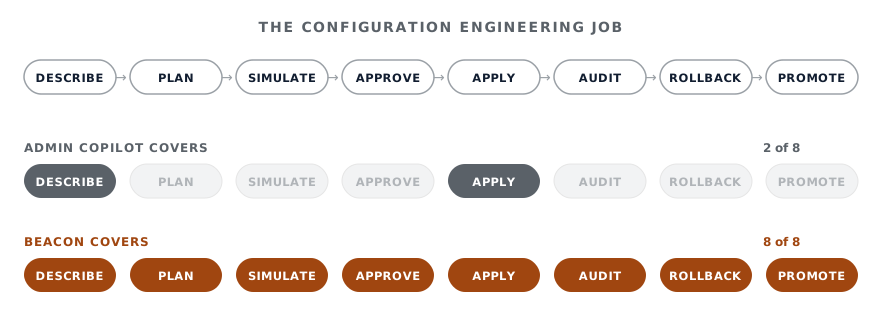
Zendesk Admin Copilot lets you ask for a trigger. Deltastring lets you engineer the configuration. Both will create a trigger when you ask. What Admin Copilot doesn't do is the rest of the engineering: the dependency analysis, the simulation, the cross-instance promotion, the approval gate with a different human, the audit trail that survives audit, the rollback that actually rolls back. That's the work this comparison is about.
Last reviewed 08/06/2026. Admin Copilot is in open EAP (since 17/03/2026) with GA on 26/05/2026 for Suite Professional and above. Both products are moving. We'll keep this current.
Admin Copilot does that beat well. Open Admin Center, ask in plain English, see the trigger appear, click approve. For a single change on a personal Zendesk, it’s a clean experience.
The configuration of a serious Zendesk isn’t a single change on a personal Zendesk. The job has ten or fifteen other beats, and most of them aren’t conversational. They’re engineering. Deltastring is the tool that does the rest of those beats. The agent interface is one front door to the same engine.
The list below is what Deltastring does that Admin Copilot, as shipped today, doesn’t.
Admin Copilot lives in Zendesk’s Admin Center. The admin has to be in Admin Center to use it. An engineer in Cursor, a CX ops lead in Claude Desktop, an analyst in ChatGPT, can’t ask Admin Copilot for help without context-switching to Zendesk.
Deltastring’s agent is MCP-callable. Whichever AI assistant your team uses, Deltastring plugs into it. The conversation about Zendesk config happens in the same place as every other conversation. The admin gets to stay in their environment instead of opening another tab.
Admin Copilot operates inside one Zendesk. There’s no native concept of “copy these triggers from sandbox to production, including their dependencies”.
Deltastring treats sandbox-to-production as a workflow. You ask for a promotion. Deltastring orders the dependencies, translates IDs across instances, and stops the push if a parent fails. The agent can drive it through MCP. The human approves it through Deltastring’s web app. This is the thing multi-Zendesk teams need every week. Admin Copilot doesn’t address it.
Admin Copilot’s “preview and approve” lives inside a chat session. When the session ends, the preview is gone. You can’t share it. You can’t reference it later. You can’t have a different person approve it.
Deltastring’s plan is a PromotionPlanRecord with a UUID, a 72-hour TTL, single-shot consumption, and the full before-state of every object that would change. You can refuse a plan and ask the agent to revise it. You can hand a plan to someone else for review. The plan is intelligence work that exists outside the conversation that produced it.
Admin Copilot’s safety claim is “preview and approve”. That’s one user previewing and approving their own action. For a real production change-management posture, that isn’t a gate.
Deltastring’s production changes return an approval URL to the web app. A different named human reviews the plan. The reviewer cannot be the API key owner who minted the plan. Self-review is blocked in code, not by policy. The asker and the approver are different humans by architecture. For the longer argument, see Why you don’t want a direct-to-Zendesk MCP.
Admin Copilot relies on Zendesk’s general audit and restore facilities to undo a change. The detail isn’t published.
Every Deltastring apply, agent-driven or not, returns a rollback token. The token holds the full before-state of every object the change touched. One click puts your Zendesk back to where it was. Exact, not best-effort.
Admin Copilot’s reads go against your live Zendesk. Every “show me the triggers” call hits the live admin API and counts against your rate limit.
Deltastring’s agent reads the most recent configuration snapshot Deltastring captured. Every response carries a freshness marker (snapshot_meta). The agent can explore your configuration for an hour without touching live Zendesk. Live API quotas stay clean.
Admin Copilot’s actions land somewhere in Zendesk’s audit. Whether they appear differently from human-driven changes, and how they reconcile with the rest of your compliance pipeline, is Zendesk’s call.
Deltastring’s audit log treats agent-driven and human-driven changes the same way. Same fields, same query surface, same export. Your compliance pipeline already knows how to ingest it.
Before applying a change to a trigger or automation, you can run Deltastring’s simulator against up to fifty real tickets you uploaded. You see which rules fire, in what order, and what they change. Logic analysis flags redundant conditions, conflicting triggers, unreachable execution paths and shadowed rules.
Admin Copilot can spot some of this through its recommendations layer (duplicate triggers, for instance). It does not simulate real tickets against a proposed change before you ship it.
Some configuration work is faster in a spreadsheet than in any UI. Deltastring exports configuration to Excel, Google Sheets or Excel Online with brand-styled workbooks, change values in the sheet, upload back, and Deltastring shows the plain-English diff before anything reaches Zendesk.
Admin Copilot is a chat assistant. It doesn’t offer this round-trip.
Deltastring generates GDPR, HIPAA and ISO 27001 framework HTML reports against your configuration on demand. If you’ve been asked to produce a configuration audit for a regulator or your security team, that’s a button click.
Admin Copilot surfaces some compliance-relevant recommendations (2FA gaps, SSO state). It doesn’t generate framework-shaped reports.
Admin Copilot is Zendesk’s AI assistant running on Zendesk’s infrastructure under Zendesk’s commercial terms. It’s bundled with Suite Professional and above, or comes via the Copilot add-on on lower plans. Either way, if Zendesk changes the pricing or the capability, you go where Zendesk goes.
Deltastring’s agent works with any MCP-compatible AI assistant. You bring the model. You pick the vendor. If the assistant you trust today is Claude, you use Claude. If it’s something else next quarter, you switch. The product underneath doesn’t change.
Honest list.
Lower friction for an admin who already lives in Zendesk’s Admin Center. No tooling to install, no key to mint, no AI assistant to choose. Open the panel, the assistant is there.
Zendesk’s own security and compliance posture. Procurement and security have already evaluated Zendesk. Adding Admin Copilot is “more Zendesk”. Adding Deltastring is a new vendor.
The recommendations stream and weekly digest. Deltastring runs the underlying detectors (broken references, conflicting triggers, view gaps, unreachable rules) but doesn’t yet package them as a Zendesk-style recommendations feed. Admin Copilot’s surfacing layer is good.
First on new Zendesk object types. Anything new Zendesk launches in Admin Center is in scope for Admin Copilot on day one. Deltastring catches up within days but isn’t always first.
A team that wants admin-facing AI inside Zendesk for the recommendations stream and the in-context assistant, plus the operating model with an external AI assistant for cross-instance promote, production gating, AI assistant integration. Admin Copilot doesn’t replace Deltastring. Deltastring doesn’t surface inside Zendesk’s Admin Center. Many teams will want both.
Admin Copilot is recent and Zendesk will keep shipping. They may add cross-instance work. They may add a richer plan/apply split. They may eventually expose Admin Copilot through an API or through Zendesk’s own MCP Server. Each of those would narrow specific items above.
What we don’t expect them to ship is the architecturally different part of Deltastring: a credentialed agent that talks to a separate governance engine rather than the platform directly, with the engine handling plan, apply, audit and rollback. That’s the shape of Deltastring, not a feature.