
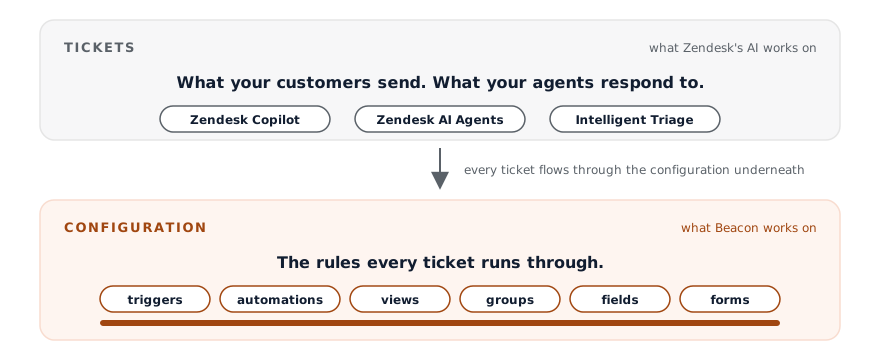
Zendesk Copilot helps your agents respond. Zendesk's AI Agents reply to customers automatically. Both work on ticket content. Neither one changes your configuration. Deltastring sits at a different layer: it manages the platform's structure, with an AI assistant as one of the ways to ask it.
Last reviewed 08/06/2026. Zendesk renames these features fairly often. We'll keep this current.
| Zendesk AI (Copilot, AI Agents) | Deltastring | |
|---|---|---|
| Works on | Ticket content | Zendesk configuration |
| Helps with | Drafting replies, routing, auto-resolving tickets | Triggers, automations, views, groups, fields, forms, the platform's structure |
| Who it serves | Agents and end customers | Admins, ops, and the people who keep the platform running |
| Can change your configuration | No | Yes, through Deltastring's safety gate |
| Audit trail for config changes | Not relevant | Full, in Deltastring |
| Replaces a support agent | Tries to, in some flows | No, this isn't a tickets product |
Zendesk’s AI surface today, after Relate 2026, is broadly three things. Copilot helps your support agents draft replies, summarises voice calls, suggests next steps, and can perform agent-approved actions. The customer-facing AI Agents (formerly Answer Bot, now priced per verified resolution) try to resolve tickets autonomously. Intelligent Triage uses ML to classify intent, sentiment, and language for routing. Behind it all is the “Autonomous Service Workforce” framing: AI agents that work alongside humans on tickets, with a Quality Score evaluating every interaction.
It’s the AI that sits inside the ticket workflow. It’s a productivity and automation layer on top of the work your team does in tickets every day.
We’re not in that market. Deltastring doesn’t draft replies, talk to customers, or resolve anything autonomously, and it doesn’t read your tickets unless you switch on Escalations, which is opt-in, reads a ticket in memory only and stores no ticket content. If that’s what you want, Zendesk’s AI is the right shape.
Deltastring manages the configuration of Zendesk. It works on the layer underneath the tickets. Triggers, automations, views, groups, fields, forms, the routing rules and the business logic. The structure your tickets flow through.
You ask Deltastring for a change in plain English, through the AI assistant your team already uses, through the Deltastring web app, or through the API. Deltastring writes a plan. You approve. Deltastring applies. The AI assistant doesn’t touch Zendesk directly. Only Deltastring does. For the longer architectural argument, see Why you don’t want a direct-to-Zendesk MCP.
The two products don’t overlap. They sit on top of each other. Zendesk’s AI runs better on a configuration that’s been audited, cleaned, and kept honest. Deltastring is one way to keep the configuration honest.
Zendesk’s framing at Relate 2026 was the Autonomous Service Workforce. AI agents that take on work end-to-end, priced per verified resolution. That’s the right framing for the ticket layer, where each interaction is bounded and a verified resolution is a meaningful unit.
Deltastring is, deliberately, not autonomous. The agent never applies a production change without a different named human approving it in Deltastring’s web app. We sell the opposite of autonomous because configuration changes aren’t bounded the same way tickets are: one change to a trigger can affect every ticket from then onwards. Different blast radius. Different gate.
The two products don’t disagree about AI. They sit at different layers with different appropriate levels of autonomy.
Zendesk’s AI runs better on configuration that’s been audited and kept honest. The reverse is also true: broken triggers and misconfigured SLAs become misconfigured-at-machine-speed when AI multiplies them.
If you’re planning to deploy more AI in your Zendesk, the configuration underneath matters more, not less. That’s the case for Deltastring sitting next to Zendesk’s AI rather than competing with it. One handles the work in the ticket. The other handles the platform the ticket runs on.
A Zendesk where the AI does well on top of a configuration you can actually see and trust.
Zendesk uses the word “agent” two ways. A support agent is a human (or, increasingly, an AI in your workflow) responding to tickets. Their AI Agents are the customer-facing automation. Our use of “agent” means an AI assistant that can call tools through MCP. Different word, different layer.
When this page says “Deltastring’s agent”, we mean the MCP-callable interface to Deltastring. When it says “Zendesk AI Agents”, we mean Zendesk’s customer-facing automation product.