
Zendesk announced their own MCP Server at Relate 2026 and have since opened an EAP for the ChatGPT Support Channel built on it. Deltastring shipped its MCP server in phases through Q2. Both work with the same open standard. They point in opposite directions and solve different problems. If your buying decision involves either, this page is for you.
Last reviewed 08/06/2026. Both products are moving fast and we'll keep this current.
The fact that both involve “MCP” and both involve “AI agents and Zendesk” is what makes this page necessary.
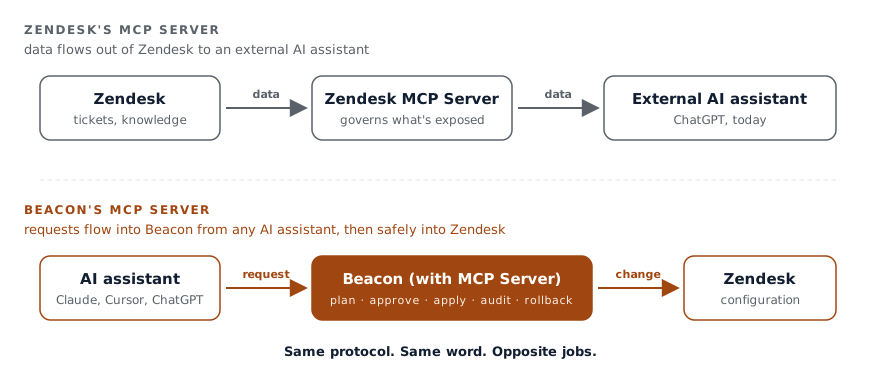
Zendesk’s MCP Server, in their own framing, lets businesses “connect Zendesk tickets, knowledge and other data to external AI systems in a governed way”. It is the outbound side: your Zendesk’s data becomes available to AI assistants and agents outside Zendesk. The first announced use case, currently in EAP, is the ChatGPT Support Channel: ChatGPT users can search and engage with your support content from inside their own conversation. The architecture extends to other MCP-compatible clients over time, but the launch shape is ChatGPT.
The use cases on Zendesk’s blog are about service workflows. Retrieve a customer’s subscription. Check inventory. Set up a shipment. Pull a record from a CRM into the ticket. AI agents (Zendesk’s own and yours) use the MCP Server to make sure they have the data they need to handle a customer interaction.
It’s a good product for that. We’d recommend it for any team using Zendesk’s AI agents that needs to extend what those agents can read.
It is not a configuration management tool. It doesn’t propose changes to your triggers, automations, or fields. It doesn’t write back to your Zendesk’s structure. It exposes data to external systems, with governance around what’s exposed.
Deltastring is the configuration management product. An AI assistant on your team’s desk can ask Deltastring, in plain English, to make changes to the structure of your Zendesk. Copy a trigger set between instances. Rename a group across every reference. Find what’s drifted since last month. Add a field to every form except the internal one.
The agent doesn’t reach Zendesk directly. It works through Deltastring, which already plans, applies, audits and reverses every change. Sandbox changes can apply through the agent after the user confirms in-flow. Production changes never apply through the agent at all: the agent returns an approval URL to Deltastring’s web app, where a different named human reviews and clicks Apply.
It’s a different category of product. It works on the structure underneath the tickets, not the tickets themselves.
These two products are not competitors in practice. They sit at different layers and a serious Zendesk operation will eventually want both.
Zendesk’s MCP Server makes the data legible to AI. Deltastring’s MCP server makes the configuration manageable by AI. The first is about what your AI agents can know. The second is about what your team can change.
If you’re using Zendesk’s AI agents heavily, Zendesk’s MCP Server is the natural extension. If you’re managing a serious configuration and want an AI assistant in the workflow, Deltastring is the natural extension. The two don’t get in each other’s way.
Both products call themselves “MCP servers”, which is technically accurate and operationally confusing. MCP is an open protocol. Anything can speak it. The protocol doesn’t tell you what the server does.
Zendesk’s MCP Server exposes Zendesk’s data. Deltastring’s MCP server exposes a configuration management engine. The protocol is shared. The job is different.
If a buyer or a security team is comparing the two side-by-side because they share the acronym, the right question to ask is “what does each one let an AI assistant actually do?”. The answers are not in the same category.
Both products use the word “governed”. The substance is different.
Zendesk’s MCP Server’s governance is about controlling what data leaves Zendesk. Permissions on which tickets and knowledge an external AI can read. This is the right shape for data egress.
Deltastring’s governance is about controlling what changes get made. Plan, approve, apply, audit, reverse. Production changes go through a named human approver in the Deltastring web app, with self-review blocked at the route. This is the right shape for configuration management. The longer argument is on Why you don’t want a direct-to-Zendesk MCP.
The two governance models don’t substitute for each other. They protect different things.
You’re running a serious Zendesk where you’ve embraced Zendesk’s AI on the tickets side and you also want to bring the configuration management under control. The two products sit alongside each other without overlap.
Zendesk’s CEO described the launch as “entering the age of the autonomous service workforce”. The framing is theirs and it’s the right framing for what they’re selling: AI agents that take on routine support work autonomously, priced per verified resolution.
Deltastring is, deliberately, not autonomous. The agent doesn’t change your configuration without a human approving the plan. For production, the apply path requires the human in the Deltastring web app. We sell the opposite of autonomous, on purpose, because the buyer of a configuration management agent has a different risk profile from the buyer of an autonomous ticket agent.
This isn’t a disagreement with Zendesk’s product. It’s a different product. Autonomous works for the ticket layer because every ticket is bounded: one customer, one issue, one resolution. Configuration is not bounded the same way: one change can affect every ticket from then onwards. Different blast radius. Different gate.
Is Deltastring’s MCP server the same as Zendesk’s MCP Server? No. They share the MCP protocol but do opposite jobs. Zendesk’s MCP Server exposes your Zendesk data outward to external AI (the first use case is the ChatGPT Support Channel). Deltastring’s MCP server takes requests inward from an AI assistant and routes them through Deltastring’s plan, approval, audit and rollback engine to change your Zendesk configuration safely.
Can an AI assistant change my Zendesk configuration directly through Deltastring? Not directly. The assistant works through Deltastring, never Zendesk. Sandbox changes can apply after the user confirms in-flow. Production changes never apply through the agent: it returns an approval URL to Deltastring’s web app, where a different named human reviews and approves, with self-review blocked.
Do I need both Deltastring and Zendesk’s MCP Server? They don’t compete, and a serious Zendesk operation may want both. Zendesk’s MCP Server makes your data legible to AI agents on the ticket layer; Deltastring makes your configuration manageable by AI. Different layers, no overlap.
Is Deltastring autonomous? No, deliberately. The agent never changes configuration without a human approving the plan, and production requires a human in the Deltastring web app. A configuration change has a wider blast radius than a single ticket, so it gets a stricter gate.