
I built an AI that does your whole Zendesk config. Then I cut it and shipped something else.
Alright look. If you’ve built a bunch of Zendesk instances you’ve noticed that it’s a pretty bad time. Zendesk is a great tool and I’m very grateful to Zendesk Inc for creating an ecosystem that has enabled me to build this business and this career. Let’s be honest. I would not be doing this if configuring Zendesk was straightforward. People pay me to solve these problems which largely start with “config is a nightmare” and then later we get to custom integrations and so on.
Here’s another thing we can all agree on. AI does loads of stuff now. There was a time when it was pretty bad. Today if you know what you’re doing and have tight processes you can get crazy amounts of work done with AI. If you don’t have those hard walls in place then it’s still a toy but I think we all know that now.
So it felt like there was an obvious next step. Your Zendesk should be built by AI. It’s what we all want really.
Now you can just give Claude a Zendesk API key and tell it to start doing things. You can export the Redback repo from Postman and feed your Claude that. It’ll work… until it doesn’t. Remember all these AI products are basically built to tell you what you want to hear. At some point it’ll get things wrong or make things up and you’ll be in a bad situation.
You know that our headline product is a Zendesk configuration management platform. Connect your Zendesk (and your sandboxes) and you can safely build and test and deploy and roll back. We’re very proud of it and you should be using it. It’s obvious that we should build AI into this platform. It should just do the config for you.
So we did. We built it.

Those who got the Beacon preview a few months ago were seeing a product full of wacky LCH gradients saying “Analyse this!” and other Claude based features. We built it and we tested it and it seemed like the obvious way to go.
Then we turned the built-in AI off.
You might think you want a dedicated Zendesk config AI tool. We thought it would be great! I’m the guy who spent months building it and realised it was wrong. Here’s why.
Someone else’s AI shouldn’t be reading your information
I’m sure you treat your data with respect. We have very precise internal processes for data handling. But you know and I know that these AI vendors are hoovering up every bit and byte of data to train the future iterations of their models.
I’m not saying your business shouldn’t be using AI or connecting it to your tools. I do say that your business should know what AI you are using and how that AI handles data. All that due diligence was a waste of time if you plug in some tool that sends everything about your Zendesk to Anthropic. We just don’t do that.
Right now these AI tools are giving us a free ride
I’ve written about this already. The AI vendors are selling compute below what it costs them right now, the way Uber sold cheap rides and Graze sold cheap snacks, to get everyone hooked before the price goes up. Enjoy the free ride yourself. Just don’t build your business on top of it. You shouldn’t build a product that essentially resells computing you’re buying at less than cost, because the day it stops being cheap the product stops making sense. A built-in config AI is exactly that product.
There’s a better approach
Your company has a chosen AI vendor and you have the configuration and protections set up on your devices and accounts as required. You also have far more context to the things happening in your business, including details on tone of voice and other items you need to bear in mind when doing Zendesk config. You should be using your own AI to update your Zendesk.
But you shouldn’t just give Claude a Zendesk API key! You shouldn’t even just connect a Zendesk configuration MCP from someone’s Github and work that way. What you need to do is have a middle layer with the correct processes and rules to ensure AI can’t break important stuff.
That’s where Beacon comes in.
Our MCP isn’t a Zendesk MCP per se. It connects to Beacon and does the work there. You get version control and auditing tools. You can have approval gates for sandbox to prod promotion. Our platform makes doing things properly and safely actually easier than just giving Claude an API key and crossing your fingers.
Here’s something our users love. Our MCP follows your rules.
You develop conventions when you build a Zendesk. Tags are chosen like this. Macros hit triggers that work in set ways. You can write the rules down. Then they sit in a document, and the config drifts anyway.
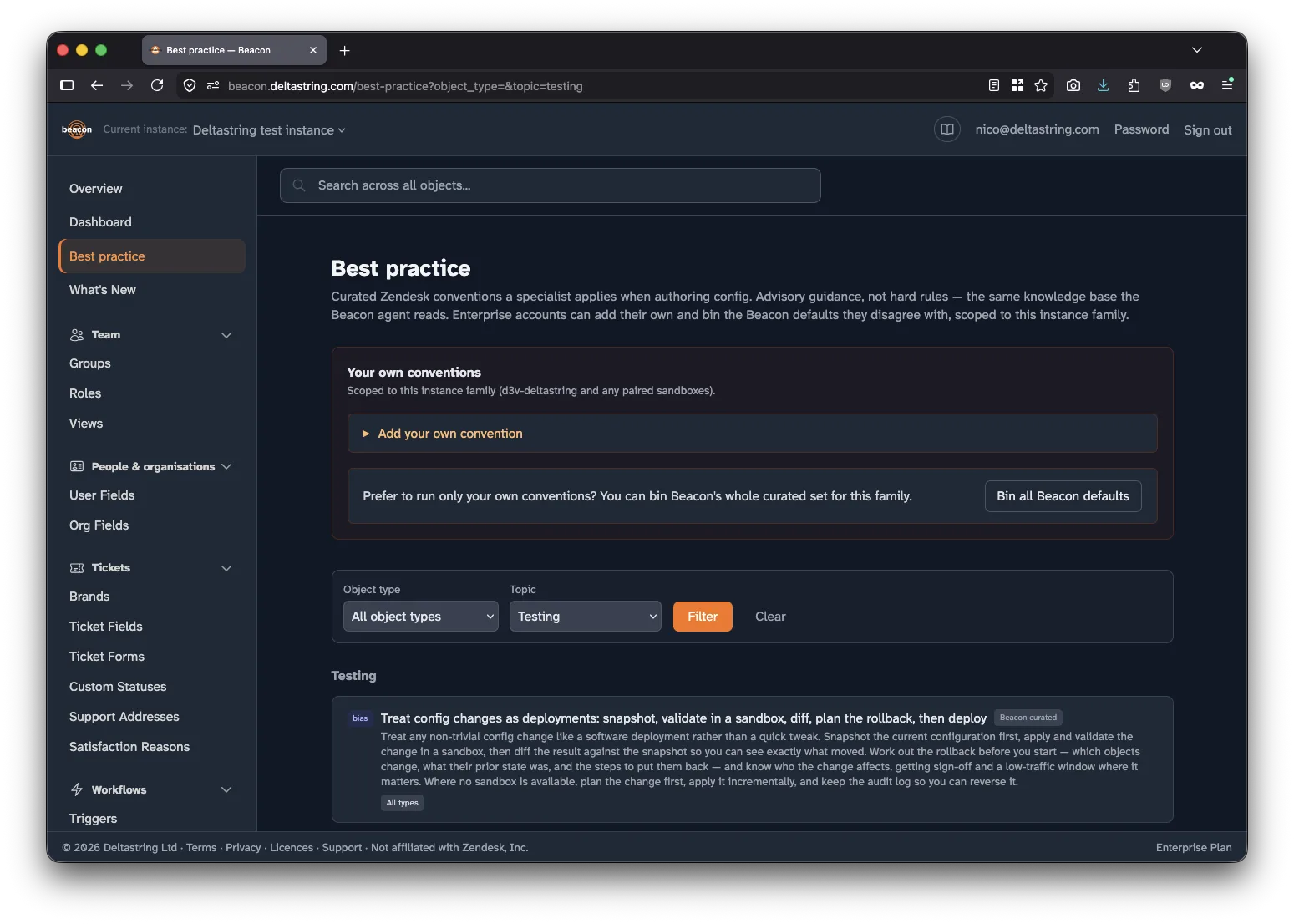
So in Beacon we made the rulebook something the config actually follows. You write your own conventions (how you name things, how you structure triggers, the patterns your team has agreed on), scoped to an instance and its sandboxes. They sit alongside the Zendesk best practice Beacon already ships. Disagree with one of ours? Bin it.
Then connect the Deltastring MCP. When an AI assistant makes a config change, it reads your conventions first and works to them. The house rules travel with the change, whoever made it.
So I spent months building the version that just does it, and then I switched it off. It’s a strange thing to admit. But you only really understand an idea once you’ve built it, and once I’d built this one I could see it was wrong.
Anyone can get an AI to change a trigger. The hard bit is what comes after. Did it do what you meant? What else did it touch? Can you put it back? A config AI that just does it skips all of that, and that’s exactly where it bites you.
So use AI on your Zendesk. Use the one your company already trusts, that you’ve set up properly, that knows how your business talks. Just don’t hand it the keys. Point it at Beacon instead. It plans the change, tests it, gets a human to sign it off, keeps the history, and puts it back when it’s wrong.
That’s the version we shipped. Your own AI, doing real work on your Zendesk, with an undo button on everything it touches. That’s the one I’d actually let near a live instance.