
Why we built the Zendesk MCP that isn't a Zendesk MCP
I’m just back from the Zendesk Showcase in London, where we spent the day showing friends and people we’ve worked alongside for years what we’ve been building. Mostly that meant passing my iPad across the table and letting someone tap a couple of questions in for themselves.

You can watch it click. Someone describes a change the way they’d ask a colleague, in plain English, and the tooling goes and does the work. It reads the whole Zendesk configuration, understands the objects and how they hang together, drafts the change, tests it, walks it through the approval step and ships it. The whole workflow gets designed, built, tested and deployed before the coffees go cold. It’s the Claude trick we’re all getting used to being impressed by, only with our full Zendesk tooling doing the work underneath. People got it straight away, because they recognised the problem it solves.
And the problem is duller than the demo. We all know how a change to a production system is meant to go. Build it in a sandbox. Test it. Promote it cleanly. Keep the audit trail. Have someone who isn’t you look at it before it ships. Version control, so that when you get it wrong you can put it back the way it was.
And we all skip half of that when the change is small and the deadline is now.
Nobody’s being lazy. It comes down to arithmetic. The change might be two minutes of actual work, renaming a group, flipping a trigger, adding a condition. Wrapping the proper process around those two minutes is twenty. So the tired engineer at the end of a long week does the obvious thing and just makes the change. Straight into production. No sandbox, no second pair of eyes, no record beyond their own memory of what they touched. It works nine times. The tenth is a bad afternoon.
People cut corners because doing it properly costs more, and when the deadline is today the cheaper way wins. So you might think the fix is to make the sloppy way harder. Lock the tokens down, write a policy, stick a gate in the way. But people just go round you. The minute your tool is the slow option, they stop using it, and now they’ve lost every bit of safety it was giving them in the first place. You can’t fence people off the grass and expect them to walk the long way round. You pave the route they already want to take. Make the careful way the easy way, and there’s nothing left to gain by being careless.
That has been the point of Beacon since before we ever called it a product. It’s a couple of years of work now, built for our own consulting because managing a serious Zendesk by clicking through the admin centre is slow and dangerous, and the disciplined way to work was too heavy to keep up under deadline. Beacon’s whole job was to make the safe way the fast way. Plan the change, see what it touches, apply it, keep the receipt, reverse it in one click if it’s wrong. Not because we’re virtuous. Because we wanted to stop having bad afternoons.
Some of that thinking I owe to Salto. I was a big enthusiast, and for an expert it’s a genuinely excellent tool. But I kept wanting something a non-technical person could pick up without first learning how configuration management works. The ambition I had for Beacon was for it to feel less like an engineering tool and more like WhatsApp or Spotify, where the application layer disappears and you just message a friend or put a record on. You don’t think about the software. You think about the thing you came to do.
The thing already happening
Then AI assistants arrived, and they turned out to be the same problem we’d been chipping at for years, only with the pressure cranked right up.
Right now, on a lot of teams, someone has pasted a Zendesk API key into Claude or Cursor to get a job done. They didn’t want to. The work was urgent, the assistant could obviously help if it could see the data, so they generated a token and pasted it in. Maybe they revoked it afterwards. The token is sitting in a chat history with no audit trail, no scope, no record of what got done with it.
It’s the pasted-API-key version of the production change with no sandbox. The proper path was “ask the admin and wait”, and that path doesn’t survive contact with a deadline. The cheap path was “paste the token”, and the cheap path won, because it was cheaper. Same arithmetic, higher stakes.
So the obvious move was to build a Zendesk MCP. Wire the AI assistant straight into the Zendesk API, give people a sanctioned version of the thing they were already doing badly. There are open-source projects that do exactly this. We’ve seen them in customer environments. They were installed for good reasons and they worked until they didn’t.
We didn’t build that.
Point it at the gate, not the API
A direct-to-Zendesk MCP makes the AI faster at the thing that was already dangerous. The model interprets your plain English, calls the API, and the change is in production before you knew whether it understood you correctly. The same model that reads “rename the Tier 2 group” right nine times will, on the tenth, read it as “rename every group with Tier in the name”. There’s nothing between the misunderstanding and your data. You can’t review what you never saw, and you can’t cleanly reverse a change nobody snapshotted first.
Then the obvious thing. The MCP shouldn’t point at Zendesk at all. It should point at Beacon. Beacon was already the thing you’d want sitting in front of a Zendesk token. It plans before it applies. It shows you every object a change would touch before anything moves. It keeps the audit trail and the exact before-state, so you can put it all back. All the AI had to do was ask Beacon instead of asking Zendesk.
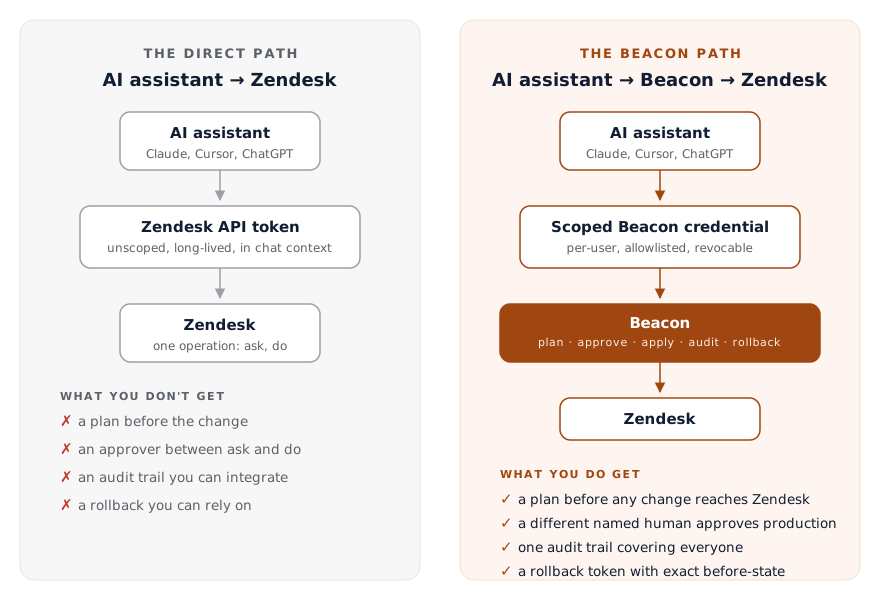
So that’s what the Deltastring MCP is. The assistant never gets Zendesk credentials. It gets a Beacon credential, scoped, with an allowlist and an audit log and revocation that’s immediate. When it reads your config it reads Beacon’s most recent snapshot, not live Zendesk, and it tells you how fresh that snapshot is. When it wants to change something it produces a plan, and the plan is read-only until a person says yes. For sandbox work the assistant can apply through Beacon once you confirm. For production it has no apply path at all. It hands back a link to Beacon’s web app, where a different named human reviews the plan and clicks Apply. Self-review is blocked in the code, not in a policy document.
The design was already done
None of the safety machinery is new, and that’s the whole point. The AI side was built to ask Beacon, and Beacon was already the way changes happen. Click through the web app, ask your assistant, or call the API, and the change takes the same route through the same gate with the same audit and the same rollback. The front door changed. The house didn’t.
It’s also the closest we’ve got to the ambition I started with, and the thing people felt at that table in London. You don’t open a tool and learn its panels. You say what you want in plain English, to the assistant you already talk to all day, and the application layer gets out of the way. The Spotify feeling, finally, for Zendesk configuration.
And it comes back round to where it started. Asking an AI assistant is about the easiest way there is to describe a change. Run that through Beacon and the easiest way to make a change is also the one that arrives with the sandbox, the plan, the audit trail and the one-click undo already wrapped around it. The person who needs the change no longer has to hold the admin’s keys, and a change to shared production still gets a second name on it before it ships. None of that is extra effort any more. The thorough way and the quick way have become the same way. There’s nothing to gain by cutting the corner, so people stop cutting it.
I keep coming back to this, and I write a lot more about it in my upcoming book, The Racing Line. The line that’s both quickest and safest is the one people will actually take. Build that line and you don’t have to talk anyone into anything.
Your team is already using AI on your Zendesk. The only choice you’ve got is whether the path it takes is one you’d have signed off. We wrote the whole thing out on why you don’t want a direct-to-Zendesk MCP.